Showing posts with label Tricks. Show all posts
Showing posts with label Tricks. Show all posts
Friday, 27 January 2012



Friday, 20 January 2012
Wednesday, 27 July 2011
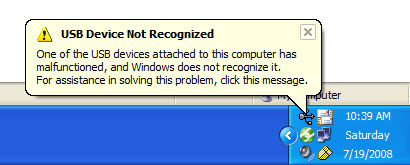
Fixing windows error: USB not recognized
It can be a common problem friends that all a sudden all your USB ports will stop working , or your windows will irritatingly starts prompting "USB not recognized" but for the error there is nothing to be worried , use the following steps and get a rid from this:
Go to device manager.
click on USB controllers , you will see a list of USb hub ports, click on each of them and unistall them one by one .
When you are finished uninstalling all your Usb ports just power off your pc and restart it after a period of 20 minutes.
When motherboard will boot it will install all the usb drivers again and you will find that all your usb ports will start working fine.
NOTE: In case of a laptop after unistalling all the usb ports shut down the laptop, remove its battery and then put it back after a period of 10 - 20 min.
Go to device manager.
click on USB controllers , you will see a list of USb hub ports, click on each of them and unistall them one by one .
When you are finished uninstalling all your Usb ports just power off your pc and restart it after a period of 20 minutes.
When motherboard will boot it will install all the usb drivers again and you will find that all your usb ports will start working fine.
NOTE: In case of a laptop after unistalling all the usb ports shut down the laptop, remove its battery and then put it back after a period of 10 - 20 min.
Monday, 25 July 2011
How to create a ad-hoc network?
Many times we need to connect two or more computers may be for gaming purposes or public data transfers for that we need a adhoc network i.e. the computer to computer network.
For creating a ad-hoc network simply follow the steps below:
1 Open network and sharing center in you computer.
2.click on set up a new connection or network.

4. now choose set up a wireless ad hoc network.
5. give a name to your network, and password if you want.
6. your ad-hoc is ready , and starts waiting for other users to connect.
For creating a ad-hoc network simply follow the steps below:
1 Open network and sharing center in you computer.
2.click on set up a new connection or network.
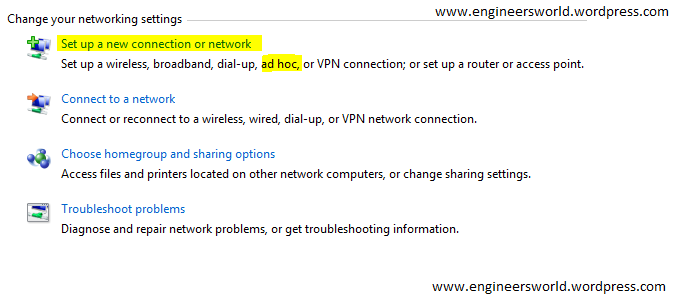
4. now choose set up a wireless ad hoc network.
5. give a name to your network, and password if you want.
6. your ad-hoc is ready , and starts waiting for other users to connect.
Sunday, 19 June 2011
Convert any format file to iso
Many times there comes a requirement of iso file but what we has the nrg formats and others.
So you can convert it through a software called magiciso , i found it while googling and i used it its really a good software...!!!
refer to the link: www.magiciso.com/download.htm
copy paste the link into your browser and thats it!!!
So you can convert it through a software called magiciso , i found it while googling and i used it its really a good software...!!!
refer to the link: www.magiciso.com/download.htm
copy paste the link into your browser and thats it!!!
houdini's last trick
Here i am presenting before you an awsome trick well known as hodigni's last trick....
try it guys:
RULES:
1.given below is the diagram,u have to start from any end and cut all the lines...thats it.

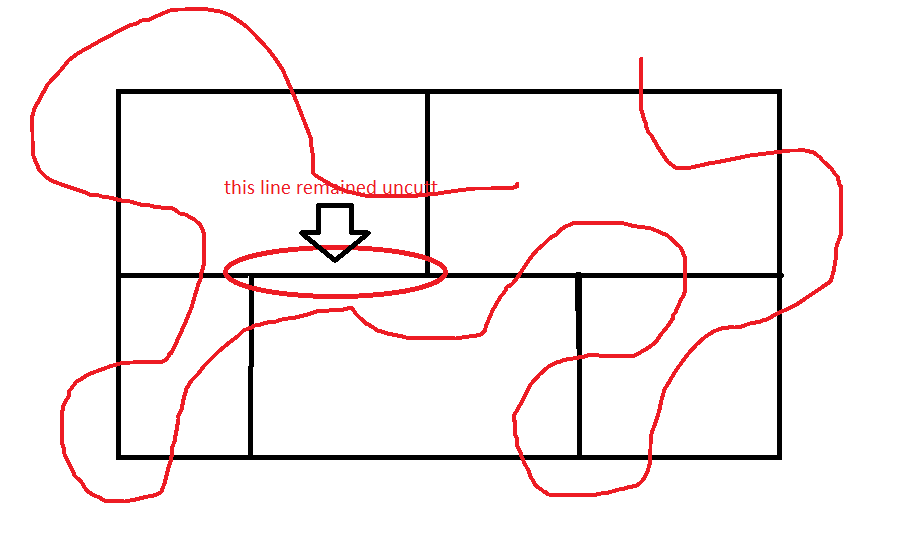
See the solution:
Thursday, 16 June 2011
Remove the complex backgrounds from pictures
Many times we need just a part of picture and there comes the use to remove the rest complex part of that picture.
It can also be the case when we need to convert a .gif or .png file.
The whole thing can be done using the photoshop. The below steps indicates the same:
1.lets taking the example of a picture and opening it in photoshop.

2.from tools select the magic tool as shown in picture
 3.Now just click on the unwanted area and when it get selected click on delete.This way remove all the unwanted areas.
NOTE: make it a layer first.

4.thats the final step just save ur final pic in .gif or .png file as you reqire.

Enjoy!!!
It can also be the case when we need to convert a .gif or .png file.
The whole thing can be done using the photoshop. The below steps indicates the same:
1.lets taking the example of a picture and opening it in photoshop.
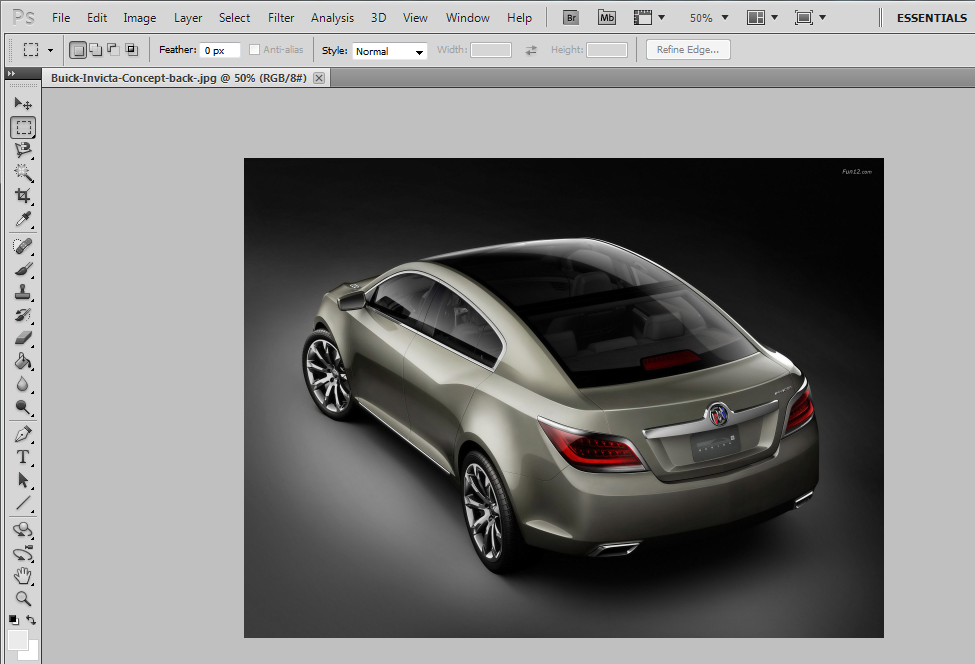
2.from tools select the magic tool as shown in picture
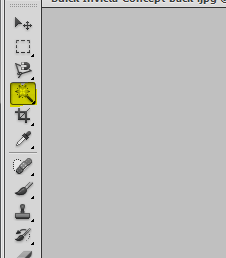 3.Now just click on the unwanted area and when it get selected click on delete.This way remove all the unwanted areas.
NOTE: make it a layer first.

4.thats the final step just save ur final pic in .gif or .png file as you reqire.
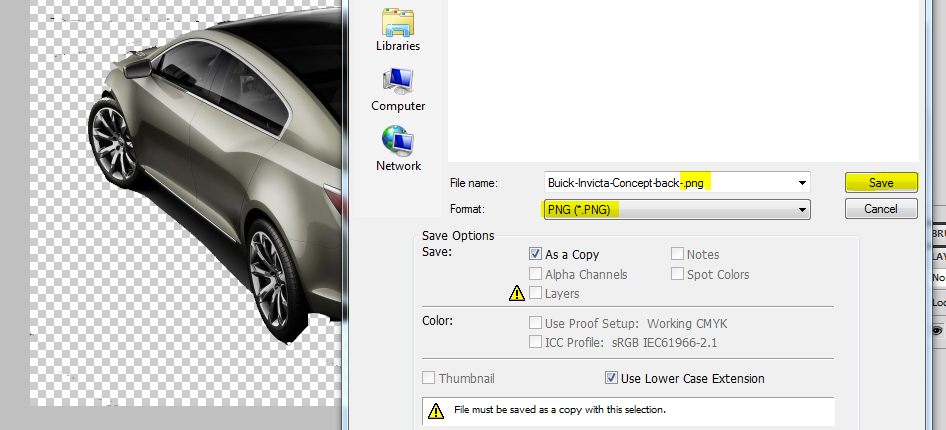
Enjoy!!!
Monday, 23 May 2011
Add your own banner on top of facebook profile
Guys you can upload your own banner at the top of your profile on facebook...see how my profile page looks like:
1. Make 5 pics in photoshop of size 96 * 67 as you want your banner to look like.Below is a sample of one:

2. Now upload each of them one by one on facebook album and tag yourself in opposite manner i.e. if you want to write HELLO then tag in opposite manner i.e. OLLEH.
3.Enjoy the trick....
for more such tips,tricks and hacks subscribe us and feel free to write us in case of any query...!!!!

1. Make 5 pics in photoshop of size 96 * 67 as you want your banner to look like.Below is a sample of one:

2. Now upload each of them one by one on facebook album and tag yourself in opposite manner i.e. if you want to write HELLO then tag in opposite manner i.e. OLLEH.
3.Enjoy the trick....
for more such tips,tricks and hacks subscribe us and feel free to write us in case of any query...!!!!
Thursday, 19 May 2011
Unable to change windows classic theme back to windows 7
RELATED POSTS:
1.Convert windows 7 trial version to full.
2.Unable to downgrade from windows 7 to xp-Sony VAIO
________________________________________________________________________________________________
Try the following ways:
1.Convert windows 7 trial version to full.
2.Unable to downgrade from windows 7 to xp-Sony VAIO
________________________________________________________________________________________________
Try the following ways:
1. Go to Services and 'themes' you will find that it is turned off.
Enable it and restart the computer.
Now go to Control Panel (all) > Display > Color Scheme it includes Basic as an option now click on that and your theme is back.
2. Go to C:\Windows\Resources\Ease of Access Themes click on basic.themes and get back your theme.
__________________________________________________________________________________________
For more such tricks and tips subscribe our newsletter and don't forget to share this article....!!
Wednesday, 27 April 2011
Multiple yahoo messenger simultaneously
You can login with multiple id's on the same yahoo messenger without any download or patch .
Follow these steps :
1. Go to Start ----> Run . Type regedit, then press enter .
2.Navigate to HKEY_CURRENT_USER --------> Software --->yahoo ----->pager---->Test
3.On the right page , right-click and choose new Dword value .
4.Rename it as Plural.
5.Double click and assign a decimal value of 1.
Its done successfully!!
now open as many yahoo messenger and use them with multiple login..
Follow these steps :
1. Go to Start ----> Run . Type regedit, then press enter .
2.Navigate to HKEY_CURRENT_USER --------> Software --->yahoo ----->pager---->Test
3.On the right page , right-click and choose new Dword value .
4.Rename it as Plural.
5.Double click and assign a decimal value of 1.
Its done successfully!!
now open as many yahoo messenger and use them with multiple login..
Subscribe to:
Posts (Atom)