Showing posts with label Wat's New. Show all posts

Tuesday, 28 February 2012

Songs.pk banned in India,Songs.pk shut down in India & Songs.pk closed

Due to the pirated supply of music kolkata high court have banned songs.pk and now it can't be accessed in india. All isp's have been asked to put an injection so that songs.pk can't be accessed.

Following are several Indian ISP names included which have to block Songs.pk in India.

  • Sify Technologies Ltd

  • Dishnet Wireless Ltd

  • Wipro Ltd

  • Hathway Cable & Datacom Pvt Ltd

  • Tata Teleservices (Maharashtra) Ltd

  • Hughes Communications Ltd India

  • Reliance Communications Infrastructure Ltd

  • Reliance Wimax Ltd

  • Bharti Airtel Ltd

  • Vodafone India Ltd

  • BG Broadband India Pvt Ltd

Tuesday, 21 February 2012

Sunday, 19 February 2012

A pilgrimage point for all engineers

Engineers world when I first heard the name I thought what's new in it. Somebody would have made a blog and named it engineers world.
But when I browsed it for a couple of days I felt no its something different.

There are projects post, facebooks tricks and also the most important a motivational stuff for all engineers. What a wonderful tutorial they have for linux "A self explanatory one". Here I see a traffic from all countries on this website.

The blog has achieved milestone and I wish to congratulate the whole engineersworld team for their work and urge them to bring more about jobs opening.

WISH YOU SUCCESS

Sudeep Gangal

Wednesday, 25 January 2012

The new secret smileys for facebook chat

Use all these codes on chat box


[[124193631030413]] - Michael Jackson
[[124195081030268]] - LOL
[[124201834362926]] - F*** Off
[[124203091029467]] - Computer Icon
[[124206401029136]] - Windows icon
[[124208857695557]] - Apple Logo
[[124211087695334]] - F*** off finger
[[124212967695146]] - Osama
[[124214267695016]] - Mr. Bean
[[124215331028243]] - Sun
[[124216534361456]] - Moon
[[124218417694601]] - Twitter bird
[[124219164361193]] - 8 Ball
[[124234194359690]] - PLT C
[[ForeverAloneComics]] - Forever Alone
[[MeGustaMeme]] - Megusta
[[164413893600463]] - Megusta 2
[[149333368464171]] - Yao Ming
[[116616581692281]] - TROLL Face
[[145768898802324]] - FUUUUUs
[[168456309878025]] - LOL
[[189637151067601]] - LOL 2
[[FapFapFap.B]] - FAPFAP
[[106043532814443]] - Y U NO
[[214457085240151]] - Nothing to do here
[[129627277060203]] - Poker faces
[[160723207280093]] - You f***ing kidding me?
[[ChallengeAcceptado]] - Challenge accepted
[[100002752520227]] - Okay
[[105387672833401]] - F*** Yeah
[[224812970902314]] - Derp
[[192644604154319]] - Derpina
[[170815706323196]] - Cereal guy
[[142670085793927]] - Mother of God
[[168040846586189]] - Feel like a sir
[[249199828481201]] - Konata Izumi
[[250128751720149]] - Domo Kun
[[223328504409723]] - Gintoki Sakata
[[236147243124900]] - Pokeball
[[326134990738733]] - Pikachu
[[155393057897143]] - Doraemon
[[224502284290679]] - Nobita
[[144685078974802]] - Mojacko
[[334954663181745]] - Spongebob
[[196431117116365]] - Shin chan
[[138529122927104]] - Pedo Bear
[[269153023141273]] - Poring
[[332936966718584]] - Hello Kitty
[[252497564817075]] - Kerokeroppi
[[297354436976262]] - Santa Claus
[[157680577671754]] - Angry Bird

new smiley facebook 2012 secret emoticons facebook facebook cheat codes for chat new smileys for facebook hidden smileys facebook new smiles for facebook chat new smiley facebook 2012

The new secret smileys for facebook chat

CREATE YOUR OWN IMAGE AS A FACEBOOK SMILEY


Use all these codes on chat box

[[124193631030413]] - Michael Jackson
[[124195081030268]] - LOL
[[124201834362926]] - F*** Off
[[124203091029467]] - Computer Icon
[[124206401029136]] - Windows icon
[[124208857695557]] - Apple Logo
[[124211087695334]] - F*** off finger
[[124212967695146]] - Osama
[[124214267695016]] - Mr. Bean
[[124215331028243]] - Sun
[[124216534361456]] - Moon
[[124218417694601]] - Twitter bird
[[124219164361193]] - 8 Ball
[[124234194359690]] - PLT C
[[ForeverAloneComics]] - Forever Alone
[[MeGustaMeme]] - Megusta
[[164413893600463]] - Megusta 2
[[149333368464171]] - Yao Ming
[[116616581692281]] - TROLL Face
[[145768898802324]] - FUUUUUs
[[168456309878025]] - LOL
[[189637151067601]] - LOL 2
[[FapFapFap.B]] - FAPFAP
[[106043532814443]] - Y U NO
[[214457085240151]] - Nothing to do here
[[129627277060203]] - Poker faces
[[160723207280093]] - You f***ing kidding me?
[[ChallengeAcceptado]] - Challenge accepted
[[100002752520227]] - Okay
[[105387672833401]] - F*** Yeah
[[224812970902314]] - Derp
[[192644604154319]] - Derpina
[[170815706323196]] - Cereal guy
[[142670085793927]] - Mother of God
[[168040846586189]] - Feel like a sir
[[249199828481201]] - Konata Izumi
[[250128751720149]] - Domo Kun
[[223328504409723]] - Gintoki Sakata
[[236147243124900]] - Pokeball
[[326134990738733]] - Pikachu
[[155393057897143]] - Doraemon
[[224502284290679]] - Nobita
[[144685078974802]] - Mojacko
[[334954663181745]] - Spongebob
[[196431117116365]] - Shin chan
[[138529122927104]] - Pedo Bear
[[269153023141273]] - Poring
[[332936966718584]] - Hello Kitty
[[252497564817075]] - Kerokeroppi
[[297354436976262]] - Santa Claus
[[157680577671754]] - Angry Bird

new smiley facebook 2012 secret emoticons facebook facebook cheat codes for chat new smileys for facebook hidden smileys facebook new smiles for facebook chat new smiley facebook 2012

Tuesday, 3 January 2012

Special add-on to rename and shorten any link

Here is a special add on for you by which you can directly register for as many free domain directly through your browser and not only that you can rename and shorten any link on any webpage of any website.


To download and install this add on just click on below link or click here:


When you click on above link a new page will open in new tab there you will see a down-loadable link just click there and you can see in below picture:


The link in red mark is the link to be clicked.


ENJOY!!!

Monday, 2 January 2012

Get a free online domain in just 2 minutes

Do you have a website , a blog or any webpage online and want it to be promoted with your own domain but don't have so much money to buy it,then nothing to worry now you can get it free with a .tk domain, you will also get a free dns and mail server.

It just requires 25 page views of your own .tk domain in 90 days as its conditions,nothing else. So grab your own by going to below links.


You can also download the direct plug-in for your browser by which you can directly convert any link into a .tk link that is you can shorten any link to your desired link.To download and install the add-on click the below links.

Monday, 21 November 2011

How to show the admin on facebook fan page.

Do you have a facebook page and want to show yourself featured that you are the admin for that page, it is very easy , just follow the below steps:

1. Go to your page.

2. Click on right corner tab saying edit page.

3. now move to Featured button in left of page and click there.

4.There you will see this type of  page.


5. Click on featured page owner button and add yourself.That's it!!!!

[join us on facebook at http://www.facebook.com/worldofengineers ]

______________________________________________________________________

You may also like to read:


Saturday, 5 November 2011

Whirling Dervish Dance Group

Indian Council for cultural relations (ministry of external affairs govt. of India) in collaboration with Suresh Gyan Vihar University , jaipur have organized a Dance show by the Whirling  Dervish Dance Group , an amazing dance group direct from cairo,Egypt.

The evening show with beautiful lights and blowing cold winds given the scenario an upper decoration, the dance group was really fantastic ,a really different style and really energetic performance.First starting with God's worship in white costume ,the dancers were looking really pure ,then they started with a colorful amazing dance using whirling them and their diversified costume.The show ended with the standing ovation by the audience and ONCE MORE , ONCE MORE in the air.A realy amazing dance performance.

_____________________________


Thursday, 27 October 2011

RA. ONE - a review on technology

RA. ONE.

RA. ONE a shahrukh khan starrer movie just released this diwali on wednesday. A movie with shahrukh khan playing lead role with arjun rampal and kareena kapoor.

Well this is not a movie review blog but talking about the most advanced technologies used in the movie it is very necessary to write over it. RA. ONE ,  is jointly produced by Eros International and Shah Rukh Khan's production company Red Chillies Entertainment and  Anubhav Sinha is the director. The SFX team at red chillies has used the most advanced computer graphics and thrilling aerial photography ever seen in india.

Even Mr. Karan Johar twitted about RA. ONE as

"I just saw 'RA.One'! Adrenalin pumping and the best computer graphics India has ever seen! Its a mega blockbuster super hero ride! Outstanding,"

RA. ONE just proved that its just a starting to the booming technology and advance media graphics in INDIA which have a great future ahead.

Wednesday, 10 August 2011

An encounter with Mr. Tapas Dasmohapatra

Well today writing this post to share my recent encounter with a great speaker

that is Mr. Tapas Dashmohapatra, a speaker of  more than 2000 seminars and meets over the life science topics like self deception and much more in his very own way.


It was his inspiring words and his technique to present them which force me to write about him and what i gained i think it will be great if i share all or a part of it.

His most focused topic was the self deception , examples were like awesome and was really interesting to hear as all were from  the common life from every aspect may it be the common home scenario or the office the friendly environs or anything it was from every part.

Well let me share one of the most inspiring and interesting incidence told my Mr. Tapas , he told how he was giving a same speech few weeks back and while he was on stage with a varied of audience in front including the business personalities , people from all age. Just in between his speech he just taken out a 500 rs note and ask anyone to come and take that note and he insured the one who will come will be the owner of that... everyone was just staring at him..as if n0 one was interested , they were staring each others face as if they are in exam hall and paper is very tough.He called out again but no one came. After a last call out he saw a 18 years young , fully enthusiastic  boy

running towards the stage he just came taken that note..he was the winner,everyone just clapped an
d he was given the note. But the interesting part came then when Mr. tapas started asking the thoughts from the different audience about the incidence...he started with the person sitting in front row "you w

a

s in front then why didn't you taken the money"..and the answer was "i thought why will u

give me that money just like that"...

Then he asked another one and he got the answer "oh!! i am a business man i didn't need your money i have much of mine"...and the other one said "well i was just about to come but then saw a child running ..ah!! and  i dropped the idea" and at last he asked that boy, yes the winner and he was quite satisfied with his answer he got that was " i thought lets try if u will give me that money then it will be ok and if you denied then also ok...surely i wont lose anything while i will go there" well thats called the positive thinking.

After the incidence everyone was just giggling and laughing but the truth was this small incidence was covered with a lot mean in itself.

There were a lot other incidences too really enjoyed the whole program and the best part was that i meet him personally after the show.really hats off to the man, he really did a great job.


Wednesday, 27 July 2011

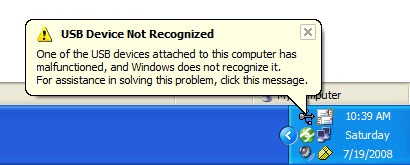
Fixing windows error: USB not recognized

It can be a common problem friends that all a sudden all your USB ports will stop working , or your windows will irritatingly starts prompting  "USB not recognized" but for the error there is nothing to be worried , use the following steps and get a rid from this:


Go to device manager.

click on USB controllers , you will see a list of USb hub ports, click on each of them and unistall them one by one .

When you are finished uninstalling all your Usb ports just power off your pc and restart it after a period of 20 minutes.

When motherboard will boot it will install all the usb drivers again and you will find that all your usb ports will start working fine.

NOTE: In case of a laptop after unistalling all the usb ports shut down the laptop, remove its battery and then put it back after a period of 10 - 20 min.

Monday, 25 July 2011

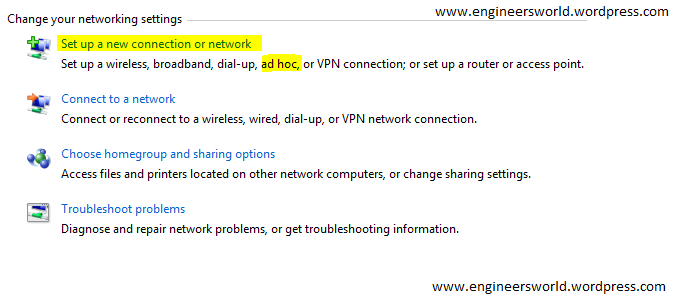
How to create a ad-hoc network?

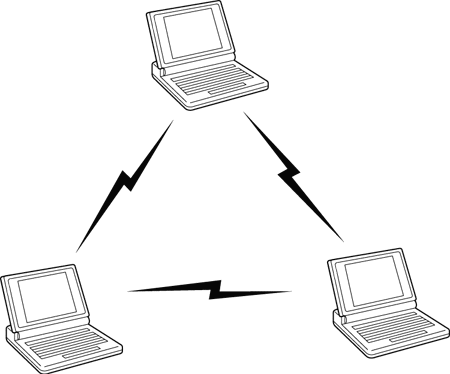
Many times we need to connect two or more computers may be for gaming purposes or public data transfers for that we need a adhoc network i.e. the computer to computer network.

For creating a ad-hoc network simply follow the steps below:

1 Open network and sharing center in you computer.

2.click on set up a new connection or network.


4. now choose set up a wireless ad hoc network.

5. give a name to your network, and password if you want.

6. your ad-hoc is ready , and starts waiting for other users to connect.

Friday, 22 July 2011

How to integrate google + to your wordpress site

You all are aware of google+ and might be seeing too a +1 button on many of the links.

If you’re not already using the Google +1 button, consider taking a moment to add it to your site. This is a great way to let users save, promote and find their favorite content. The +1 button only takes a few minutes to integrate with your site and works with any Google profile. While this isn’t a Google+ specific feature, we wouldn’t be at all surprised to see it integrated with the service. Either way, it’s another great way of adding an additional avenue for promotion and sharing.

You can learn more about the +1 button from Google.

To add it to your WordPress site, you can  use the official +1 button code generator .

Tuesday, 12 July 2011

How to stop peoples tagging you on facebook??

Are you really fed up with the tagging trend going on now a days on facebook??  Don't worry you can have a permanent solution for that:

1. Go to your facebook account

2. Accounts > privacy settings >custom

3. There click on customize settings. you will get a window showing "Things Other Share"

4.There  click on edit settings in “Photos and videos I’m tagged in” tab.

5. Then in ‘Who can see photos and videos I’m tagged in’ choose customize and that will take you to the screen where you get two options “Make this visible to” and “Hide this from”.

6.In “Make this visible to” choose only me and click on save settings.

That's it !!!!

How to fix Facebook error Account Temporarily Unavailable?

Many times we see a facebook error while we try to acess our facebook account saying

Account Temporarily Unavailable

Your account is currently unavailable due to a site issue. We expect this to be resolved shortly. Please try again in a few minutes.


Watch this video till the end to resolve or fix the issue permanently.

Screenshot_20210528-185749_Chrome

Or click here to directly watch video on youtube:

How to fix facebook error temporarily unavailable?

Many times we see a facebook error while we try to acess our facebook account saying

Account Temporarily Unavailable

Your account is currently unavailable due to a site issue. We expect this to be resolved shortly. Please try again in a few minutes.

Here the main culprit is cookies, and the problem can be fixed by deleting the cookies in your browser.

How to clear cookies on Crome?

■ Go to three dots on right side on top of browser

■ settings > privacy > clear beowsing data

How to clear Cookies on Firefox??

Go to Tools > Options > Privacy then click the link remove all cookies.

How to clear Cookies on Internet Explore??

Go to Tools > Internet Options > General Tab then in the browsing history click the delete button check cookies and click the delete button.

It will solve your problem and next time you will get your original account without an error message.

For facebook app

■ go to mobile settings

■ settings > apps > facebook > storage

■ click on clear cache

That’s it. This should resolve your problem.

Workaround if it still happens:

■ Go to facebook.com/home instead of facebook.com

■ Second option is to Use facebook business creator studio. Go to business.facebook.com/creatorstudio and there use it to post updates.

■ For a permanent fix, change the page role in your facebook page as admin via second step.

Recent update:

If issue still exists! click here to watch solution part 2 with updated trick to permanently resolve this issue.

Screenshot_20210624-205912_Chrome~2

How to fix Facebook error Account Temporarily Unavailable?

You may also like to read:


________________________________________________________________________________________________

Many times we see a facebook error while we try to acess our facebook account saying

Account Temporarily Unavailable

Your account is currently unavailable due to a site issue. We expect this to be resolved shortly. Please try again in a few minutes.


the problem can be fixed by deleting the cookies in your browser.

How to clear Cookies on Firefox??

Go to Tools > Options > Privacy then click the link  remove all cookies.

How to clear Cookies on Internet Explore??

Go to Tools > Internet Options > General Tab then in the browsing history click the delete button check cookies and click the delete button.

It will solve your problem and next time you will get your original account without an error message.

__________________________________________


Problem still exists: Click Here to get more help.


Note: Just for EWD welfare , kindly fill a survey when u click on the link above , then download the file and use it.

_______________________________________________________________________________________________

Monday, 11 July 2011

First tweet by Google

Guys you all must be on twitter but do you know What was the first tweet by google,Ya so here it is, little amazing.

Try to decode this before checking the correct answer:

I'm 01100110 01100101 01100101 01101100 01101001 01101110 01100111 00100000 01101100 01110101 01100011 01101011 01111001 00001010


well the answer is ""i' m feeling lucky""

You can easily decode it through a binary to text converter...really Google rocks.

How to transfer data through a adhoc network


Many times we come across the situation when we don't have a pen drive or any data traveler device to transfer the data between the two computers.

Then we have only an option of bluetooth ,but as data speed is very slow we can try try for an other option through wireless network.

We can get a  data transfer speed of 600 kb/s to 1 mb/s through an adhoc i.e. computer to computer network.

The following are some simple steps how can we do that:

1.Create a adhoc network and let other computer to connect through it.

2.Now give the ips to both the computers,remember to give same class ips to both the computers.

3.Then go to run and type \\ip of other computer , then press enter.

4.Enter the username and password if enabled on that computer.

5.You will get an window open with the files shared on that client computer,now You can easily share the data by just making it

shared.

Write us if you get any problem during the same and don't forget to share it.Enjoy!!!